
AI Floor Plan Generator
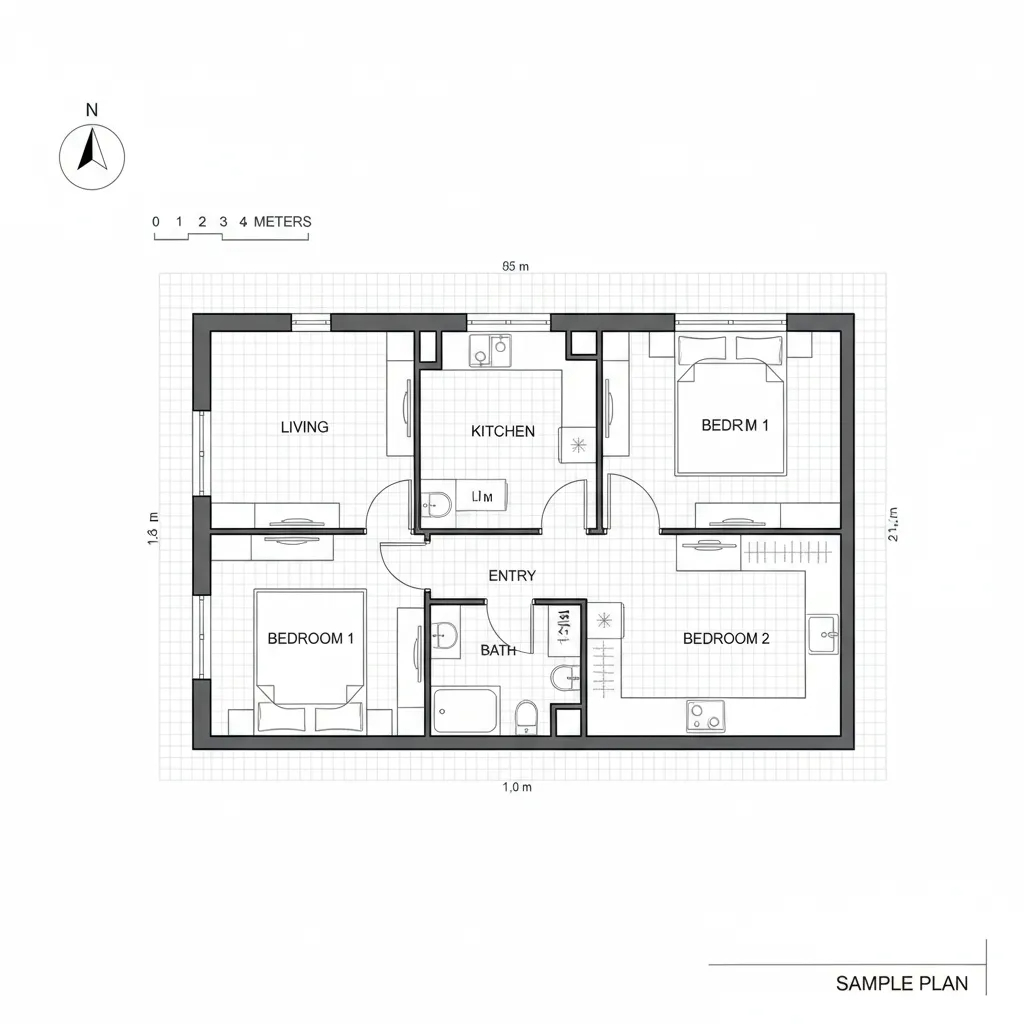
Generate labeled room layouts from text descriptions or hand sketches in seconds. The AI floor plan generator produces proportionally accurate layouts with room names, door swings, window markers, and approximate dimensions— ready to export as PDF for presentations or DXF for your CAD workflow.
- Text-to-plan: describe rooms, sizes, and adjacency rules — get a labeled layout.
- Sketch-to-plan: upload a hand drawing and convert it to a clean digital plan.
- Adjacency constraints: specify which rooms should be next to each other.
- Multiple exports: PDF for sharing, DXF for CAD/BIM, PNG/JPG for quick use.
How It Works
- Choose your input method. Type a text description (e.g., "3-bedroom, 2-bath, 1,500 sqft, open kitchen-dining") or upload a photo of a hand-drawn sketch.
- Set constraints. Specify room counts, total area, adjacency rules (kitchen next to dining, bedrooms away from living), corridor widths, and entry points.
- Generate variants. The AI produces 3–6 layout options varying room proportions, hallway placement, and window positions while respecting your constraints.
- Refine and iterate. Select a variant and adjust: move walls, resize rooms, add or remove doors. Each edit regenerates the layout in seconds.
- Export. Download as PDF (presentation-ready with labels and dimensions), DXF (import into AutoCAD, Revit, SketchUp), or PNG/JPG for quick sharing.
Input Options
Text Description
Best for early-stage concepts when you know the program but haven't drawn anything yet.
3-bedroom single-story home, 1,800 sqft
Open kitchen → dining → living flow
Primary bedroom with en-suite + walk-in
Two secondary bedrooms share a hall bath
Laundry room adjacent to garage entry
Front entry foyer, rear patio access from living
Hand Sketch Upload
Best when you have a rough layout in mind. Take a photo of your napkin sketch or whiteboard drawing.
- Use dark lines on white paper for best results.
- Label rooms if possible — the AI reads handwritten text.
- Include door swings and window positions for higher accuracy.
- Straight-ish walls produce better output than curved freehand.
Constraints That Improve Results
Dimensional Constraints
- Total area (e.g., 1,500 sqft / 140 m²) anchors room proportions.
- Minimum corridor width ≥ 1.1 m (3.6 ft) for circulation.
- Door widths: 0.8–0.9 m standard, 1.2 m for accessibility.
- Window-to-floor ratio hints for natural light placement.
Adjacency & Flow
- Public zone (living, dining, kitchen) near entry.
- Private zone (bedrooms) separated by hallway or buffer.
- Wet rooms (kitchen, bathrooms, laundry) clustered for plumbing efficiency.
- Specify "kitchen ↔ dining" to enforce adjacency.
Who Uses AI Floor Plan Generators
Architects & Designers
Rapid concept iteration during schematic design. Generate 6+ layout options in minutes instead of hours. Export DXF to refine in Revit or AutoCAD.
Real Estate Developers
Test unit mixes and layouts before engaging an architect. Validate that a program fits the site and budget constraints early in feasibility.
Homeowners & DIYers
Plan renovations, additions, or furniture layouts. Communicate ideas clearly to contractors with labeled plans instead of verbal descriptions.
Export Formats
| Format | Best For | Details |
|---|---|---|
| Client presentations, printing | Labeled rooms, dimensions, scale bar. Print-ready at A3/A4. | |
| DXF | CAD/BIM workflows | Import into AutoCAD, Revit, SketchUp. Walls on separate layers. |
| PNG/JPG | Quick sharing, social media | High-resolution raster. Ideal for Slack, email, or presentations. |
Tips for Better Floor Plans
- Be specific about room counts and sizes. "3 bedrooms, primary 14×16, secondaries 11×12" beats "a few bedrooms."
- Specify entry and circulation. Where is the front door? Where do hallways connect?
- Cluster wet rooms. Kitchen, bathrooms, and laundry near each other reduces plumbing complexity.
- Iterate one variable at a time. Change room size OR adjacency per iteration, not both.
- Use the DXF export as a starting point, not a final document. Trace and dimension in your CAD tool.
Limitations & Responsible Use
- AI floor plans are illustrative and proportionally accurate, not construction-grade.
- Dimensions are approximate — verify and refine in CAD/BIM before permitting.
- Structural elements (load-bearing walls, columns) are not analyzed. Consult a structural engineer.
- Building code compliance (egress, accessibility, fire separation) requires licensed review.
Related Tools
- Hand Sketch to DXF — convert paper sketches to editable CAD files.
- AI Architecture Generator — generate exterior renders and design studies.
- AI Architecture Rendering — photoreal lighting and material recipes.
- Architectural Styles Library — style atoms and material palettes.
Frequently Asked Questions
Can I generate a floor plan from a text description?
Yes. Describe the number of rooms, approximate square footage, adjacency requirements (e.g., kitchen next to dining), and the AI generates a labeled layout with room names, door swings, and approximate dimensions.
What file formats can I export to?
PDF for presentations, DXF for importing into CAD software (AutoCAD, Revit, SketchUp), and PNG/JPG for quick sharing.
Are AI floor plans dimensionally accurate?
They are proportionally accurate and great for concept planning, but not construction-grade. For permit-ready drawings, trace the output in CAD/BIM and have it reviewed by a licensed professional.
Can I convert a hand-drawn sketch into a digital floor plan?
Yes. Upload a photo of your hand sketch and the AI will interpret the layout, straighten walls, add labels, and produce a clean digital plan. Works best with clear, high-contrast sketches on white paper.
How is this different from traditional CAD software?
AI floor plan generators produce concept layouts in seconds from text or sketches, while CAD requires manual drawing. Many architects use AI for rapid early-stage concepts, then refine the chosen layout in CAD for construction documents.
Changelog
- 2026-03-27 — Expanded content: how it works, input options, use cases, export formats, tips, and comprehensive FAQ.
- 2025-09-12 — Initial floor plan generator page with hero image.