
Vacant land visualization: put a house on the lot photo with AI
Upload a photo or drone shot of an empty lot and describe the home. Get a realistic house, driveway and landscaping built into the actual scene in about 30 seconds, for land listings, builders and lot sales.
Paid plans only: Starter $29/month for 50 generations ($14.50 for the first month), Pro $79 for 200. Each photo edit is one generation. No free trial; cancel anytime.
Upload your photo, keep or edit the prompt, press generate. The prompt is already filled in with what paying customers use for this job.
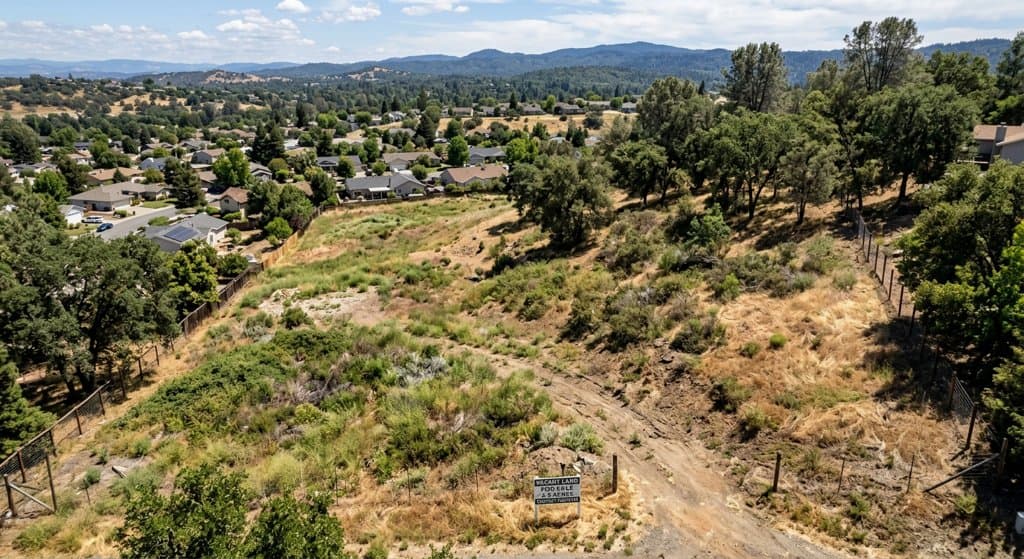
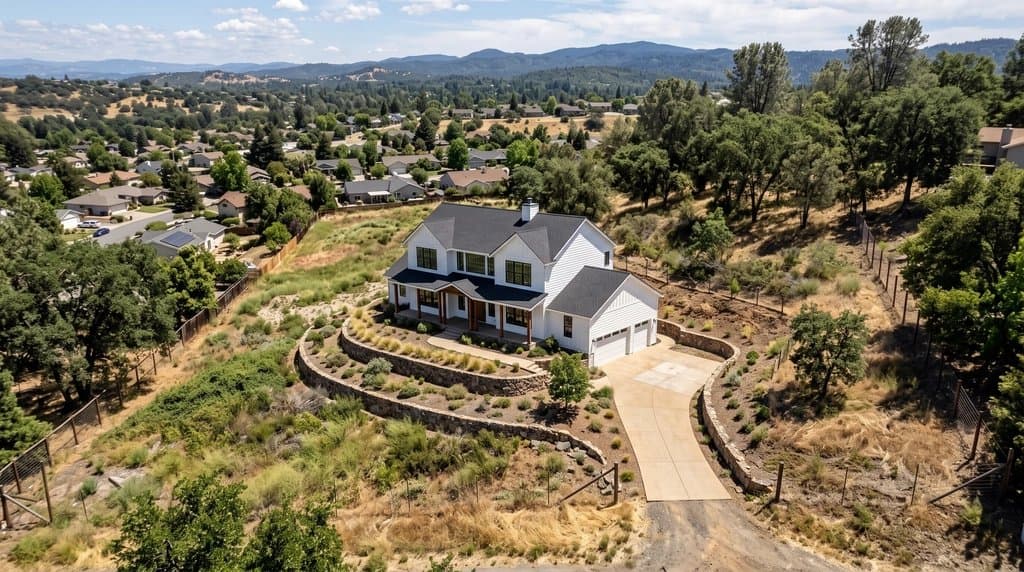
Real before and after
Unretouched outputs of the tool above. The input photos are AI-generated sample scenes, so no client's property is shown.
How to do it
- Upload a photo or drone shot of the vacant lot, ideally from the street or a 30–45° aerial angle.
- Describe the house: storeys, style, roof and siding colors, garage, pool. Or just ask for "a house of similar style and scale to the neighbors".
- Say how it sits on the land: "contoured to the slope", "walk-out basement facing the valley", "set back behind the oak trees".
- Generate. Try two or three styles for the same lot to show buyers or builders the range.
- Label the result as a concept rendering in the listing; it is not a permitted plan.
Land is the hardest listing to sell from a photo
Photos of raw land show dirt, weeds and a for-sale sign. Buyers who are not builders cannot see the house, and land listings sit on the market for months. A visualization of a finished home on the actual lot, from the actual camera angle, turns the listing photo into the answer to “what could I build here?”.
Architectural renderings of a lot used to need a 3D model and a visualization studio. Here the photo is the model: the AI keeps the terrain, the trees, the neighbors and the light, and builds the house into the scene.
What our customers place on their lots
- “Fill the empty lot with a house of similar style and scale to those in the scene, add a pool in front and a short driveway to the street.”
- “Add a two-storey beach house similar to those surrounding the lot. Roof is white, house is light blue.”
- “A two-storey modern farmhouse with white siding, black door and roof, attached double garage, contoured to the natural slope.”
Customers who bought for this job stayed subscribed for more than four months on average: every lot they list is a new photo to visualize. Pair it with lot lines on the drone photo to show both the boundary and the potential, and see the full agent workflow on AI for real estate agents.
Designing the house itself? AI house design gives you a dimensioned plan and a photoreal exterior from a short brief.
FAQ
How do I show a house on a vacant lot photo?
Upload the lot photo in the tool on this page, describe the house you want or keep the prompt ("a house of similar style and scale to the neighbors"), and press generate. You get the same photo with a house, driveway and landscaping placed on the lot in about 30 seconds.
Is the house buildable as shown?
Not necessarily. The AI places a plausible house in the photo; it does not check setbacks, zoning, slope stability or utilities. Present it as a concept ("artist's impression") and refer buyers to the local zoning rules or a builder.
Can I get a floor plan for the house too?
Yes. Plan Chat designs a measured floor plan with PDF and DXF from a short description, and the AI floor plan generator turns a sketch into a clean drawing. Many land listings show the lot photo, the visualization and a sample plan together.
What does it cost?
Each visualization is one generation. Starter is $29/month for 50 generations ($14.50 for the first month), Pro is $79/month for 200. No free trial; cancel anytime.
Does it work for subdivisions and commercial land?
Yes. Ask for "a row of six townhouses", "a small strip mall with parking" or "a barn and paddocks". For a lot with marked boundaries, first add lot lines, then place the building inside them.
Real estate photo tools
Everything an agent needs for one listing, on one account. See all of them on the real estate photo tools page or read how agents use AI Architectures.
Land, lots & drone photos
- Lot lines on drone photosDraw the property boundary on an aerial listing photo.
Listing photo fixes
- Remove window glareClear glare, flash hot spots and blown-out windows.
- Day to twilightTurn a daytime exterior into a dusk shot with lit windows.
- Blue sky replacementSwap a gray sky for a clear one.
- Declutter photosRemove personal items and clutter.
- Remove cars from the drivewayClean up the front of the house.
- Remove snowShow the property in a green season.
- Straighten vertical linesFix leaning walls from wide-angle shots.
Virtual staging
- Listing Kit (batch staging + MLS labels)Stage and fix a whole listing, download with AI disclosure.
- Remove furnitureEmpty a furnished room before restaging.
- Scandinavian stagingLight, minimal staging for empty rooms.
- Coastal stagingRelaxed coastal furniture and decor.
- Screened porch stagingFurnish porches and outdoor rooms.
- Virtual staging guideRules, disclosure and what sells.
Floor plans for listings
- Listing floor plan from a sketch or old planClean, labeled 2D floor plan drawing.