
Virtual staging for real estate: stage the whole listing with AI
Upload every photo of the listing, stage the empty rooms in one style so they look like one home, fix glare and turn the front to twilight, then download one ZIP with AI-labeled copies, your originals and the MLS disclosure. A 20-photo listing is 20 generations: $11.60 of a $29 Starter month.
Paid plans only: Starter $29/month for 50 generations ($14.50 for the first month), Pro $79 for 200. Each photo edit is one generation. No free trial; cancel anytime. + VAT where applicable (EU)
Drop up to 25 listing photos or
JPG, PNG or WebP up to 20 MB · 100 credits per photo · each original is hosted unchanged with its own link
The kit contains the edited photos, copies with a visible “AI” label, your untouched originals, a hosted link and QR code to each original (ORIGINALS.html) and a disclosure text you can paste into the MLS remarks. AI can make mistakes: check every photo before you publish it, and never use edits to hide defects of the property.
Virtual staging before and after: real outputs
Unretouched results from this tool. The input photos are AI-generated sample rooms, so no client's home is shown. Captions say what went wrong where something did.
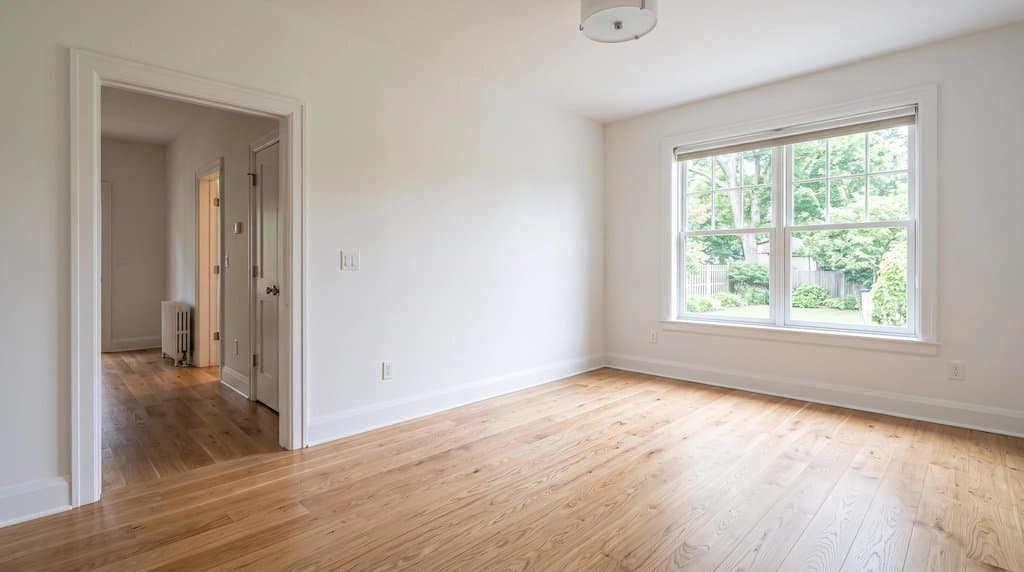 Before
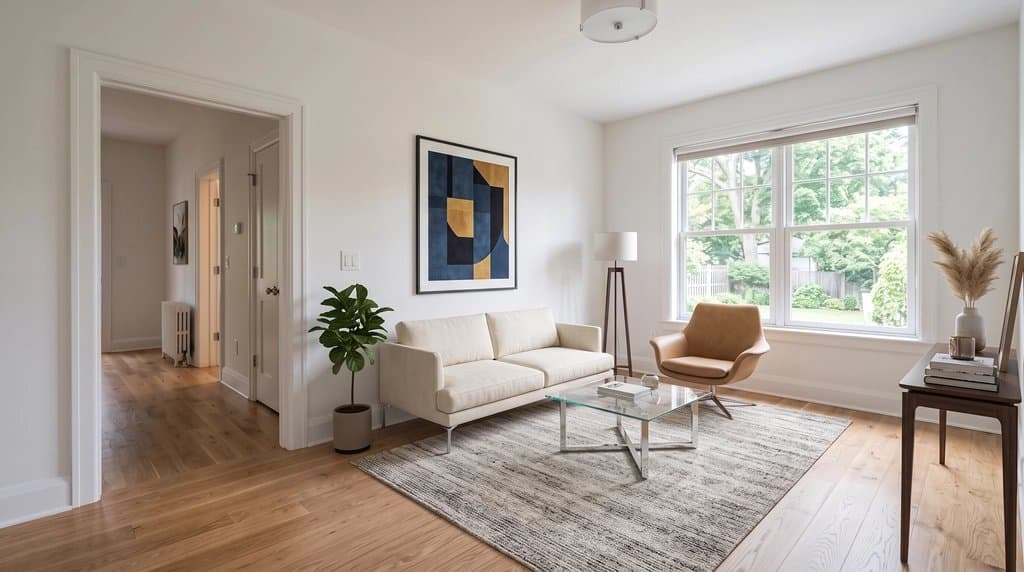 After (AI)Before
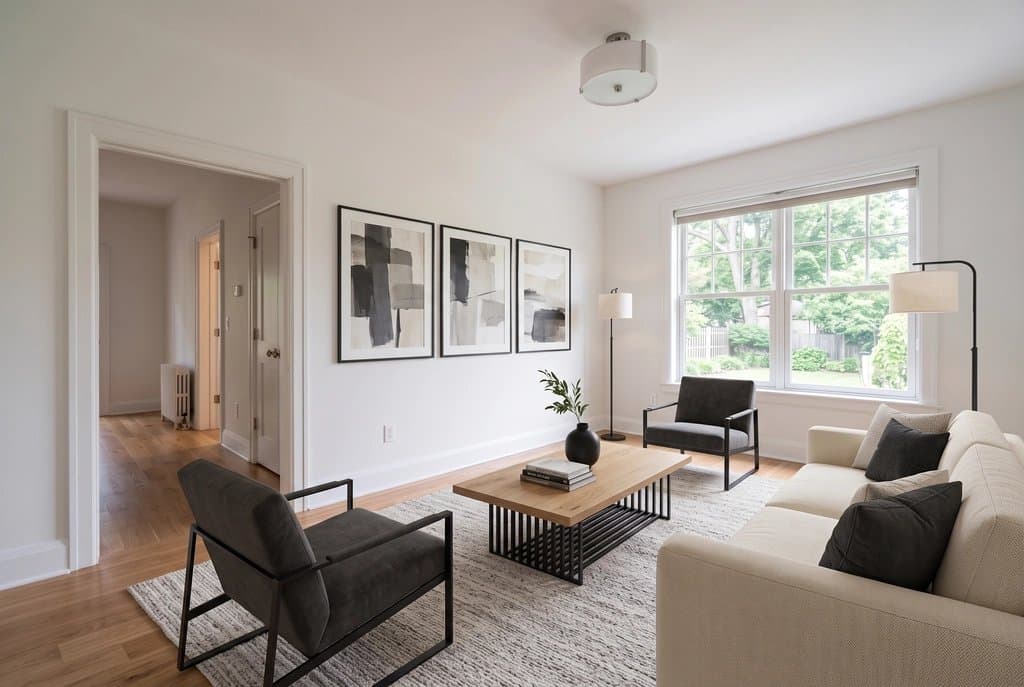 After (AI)
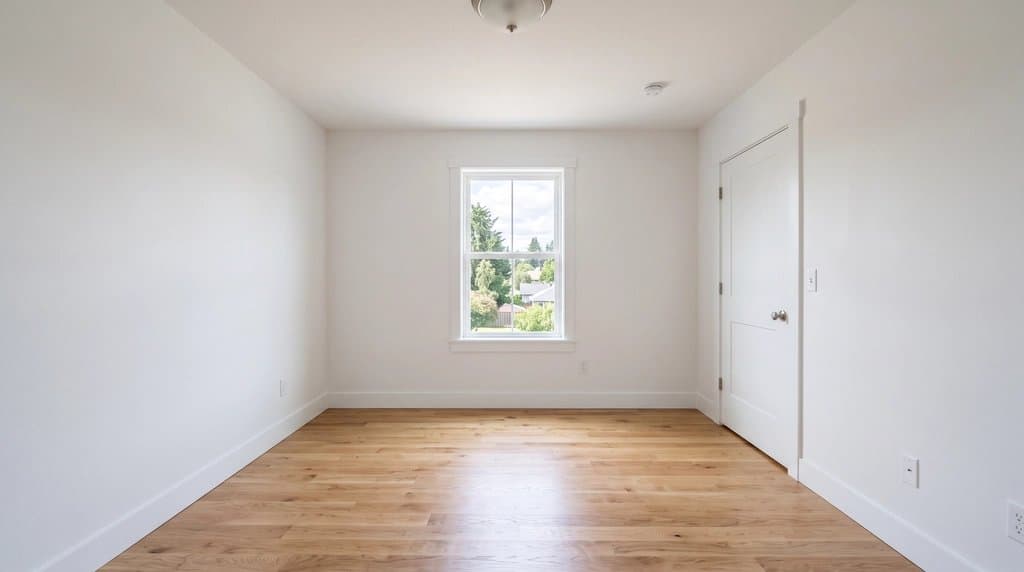 Before
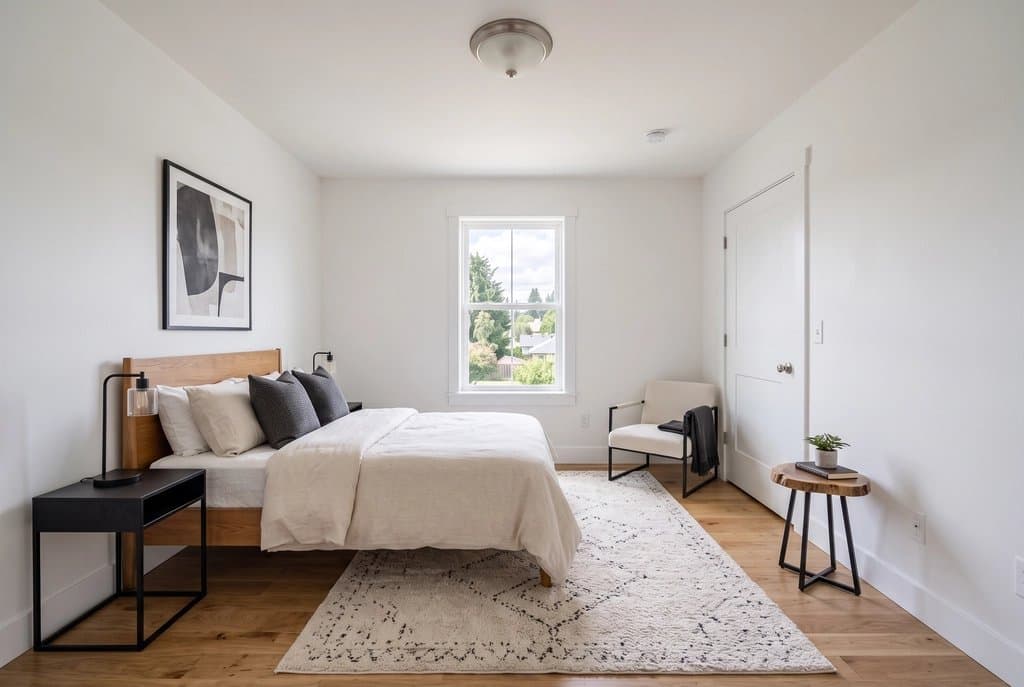 After (AI)
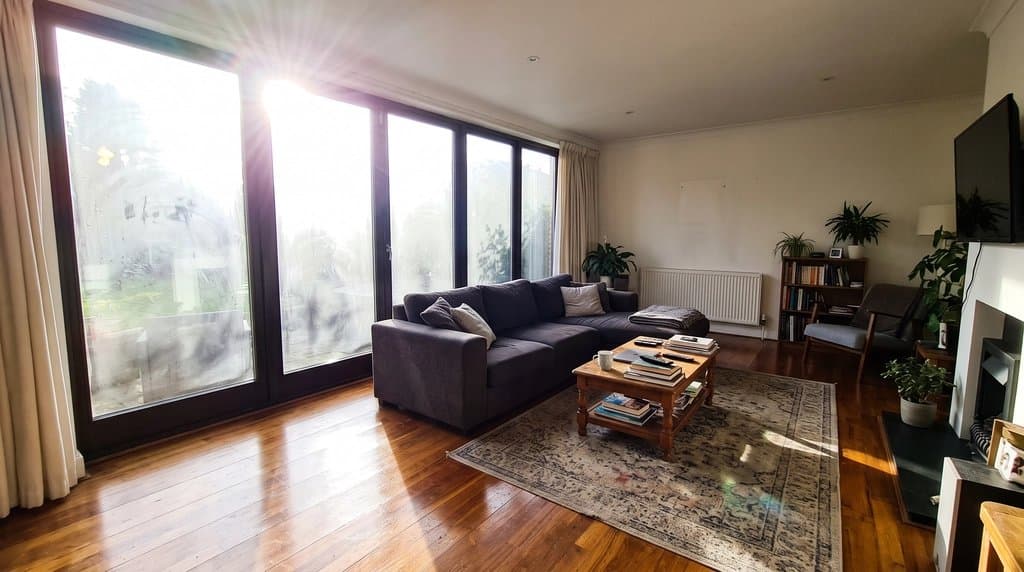 Before
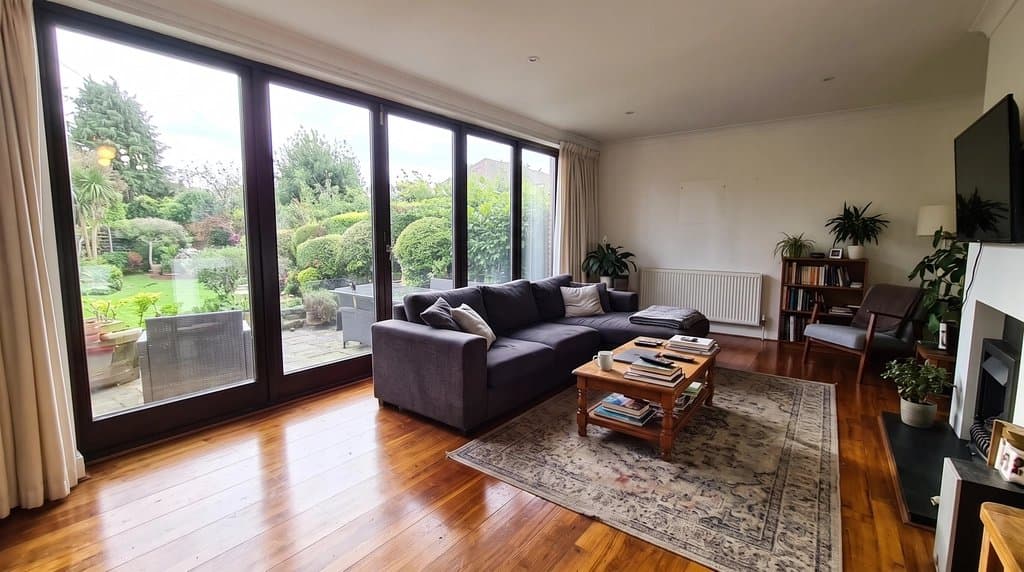 After (AI)
The cheapest way to virtually stage a whole listing
The cheapest way to virtually stage a whole listing as a realtor is an AI staging tool on a monthly plan, not per-photo human staging: here all 20 photos of a listing cost $11.60 of a $29 Starter month, against $96 to $180 for six rooms from a human service. Priced for one 20-photo listing with 6 empty rooms to stage and the rest to touch up. Published prices, checked October 2026.
| Option | Price | One listing | Turnaround |
|---|---|---|---|
| AI Architectures Listing Kit | $0.58 per photo (Starter, $29 for 50) | $11.60 for all 20 photos | Minutes |
| Other AI staging apps | About $0.50 to $2.70 per photo on monthly plans | $3 to $16 for the 6 staged rooms | Minutes |
| Human virtual staging service | About $16 to $30 per photo (e.g. Styldod, BoxBrownie) | $96 to $180 for the 6 rooms, edits extra | 24 to 48 hours |
| Physical staging with rented furniture | $1,500 national median (NAR 2025); $500 to $600 per room per month rent | $1,500 to $3,000+ for the listing period | Days to book and install |
Where these numbers come from, and what the research says about results (staged vs virtually staged vs empty), is in virtual staging cost vs home staging: prices and results. Six staging tools ranked side by side (Collov, Virtual Staging AI, REimagineHome, Apply Design, BoxBrownie): best virtual staging software for real estate agents (2026). One tool against ours, per listing: Virtual Staging AI, BoxBrownie, Collov AI, REimagineHome, Apply Design (all comparisons).
AI virtual staging: what it does well, and where you still check
Free image apps can stage a single photo now. Where they fall short is the listing: twenty photos where the living room and the bedroom look like the same home, where nothing structural moved, and where every altered photo is labeled with the original at hand. That is the job this tool is built for.
- One style across the gallery. The kit sends the same written palette and materials with every staged photo. The pieces themselves are generated per photo, so the same sofa will not appear in two rooms.
- Structure is locked in the prompt, not guaranteed. Every prompt says to keep walls, windows, doors, floor, ceiling and camera. Compare each result with the original and redo any photo that changed a window or a door.
- Tell it what the room is. An empty room can be a bedroom, an office or a den. One short hint per photo fixes most wrong guesses.
- Never hide a defect. Staging adds furniture. It must not cover water damage, cracks or a missing appliance; that is misrepresentation, not marketing.
Is AI virtual staging allowed in California under AB 723?
Yes. AI virtual staging is allowed in California under AB 723, provided every digitally altered listing photo is disclosed as altered and the unaltered original is made available (usually a link or QR code). An AB 723 compliant virtual staging workflow therefore needs three things from the tool: the altered photo, a clear label, and the original kept and linkable. Compliance itself is the agent's duty; no tool can be “compliant” on its own. This is not legal advice.
Most US MLSs ask for a visible note on virtually staged photos. In California, AB 723 has required since January 1, 2026 that an advertised digitally altered photo is disclosed as altered and that the original is accessible, usually by a link or QR code. The Listing Kit puts both in the download: labeled copies, an originals/ folder and DISCLOSURE.txt with a suggested MLS remark.
For the agent workflow (one style per listing, MLS order, lot lines on the aerial, what you still have to publish yourself), see virtual staging for realtors.
How to virtually stage a listing
- Drop the listing's photos into the kit (up to 25 at a time).
- Pick one staging style for the whole gallery: modern, Scandinavian, transitional, farmhouse, coastal, mid-century modern or luxury contemporary.
- Set each photo's step: virtually stage, remove furniture, declutter, brighten, remove window glare, day to twilight, blue sky, green lawn or lot lines. Add a hint where the room is ambiguous ("this is a home office").
- Process the photos, compare each result with the original and redo any photo where something structural changed.
- Download one ZIP: edited photos, AI-labeled copies, your untouched originals and DISCLOSURE.txt with a suggested MLS remark.
Single steps have their own pages: remove furniture before restaging, Scandinavian staging, coastal staging, porch and outdoor rooms, window glare, day to twilight and lot lines on drone photos. The Listing Kit page has the same tool without this guide.
Listing pack
$29 one listing, one-time
+ VAT where applicable (EU)
- Up to 25 photos of one listing
- Staging in one style across the gallery, glare, twilight, sky, lawn, lot lines
- ZIP with edited photos, AI-labeled copies, originals and a disclosure text
- Photos in your MLS order
Paid once. Nothing renews.
Agent plan
$79 per month
+ VAT where applicable (EU)
- Several listings a month (about 8 listings of 25 photos)
- Everything in the listing pack
- Floor plans and every other tool on the account
- Cancel anytime
First month $39.50, then $79/mo until you cancel.
Secure checkout by Stripe. Prices before VAT; where VAT applies, checkout adds it. Not right for you? Write to users@20.vision within 14 days of your first payment for a full refund.
Virtual staging FAQ
What is the best virtual staging software for real estate agents in 2026?
It depends on how you list. For whole listings (one style across every room, labeled copies and the originals for MLS and AB 723 disclosure), an AI listing tool on a monthly plan is cheapest and fastest; ours costs $0.58 a photo on Starter. Human-edited services such as BoxBrownie or Styldod cost about $16 to $30 a photo and suit luxury listings that need a designer touch. Whatever you pick, compare each staged photo with the original: AI can still change a window or a door.
Which virtual staging tools are AB 723 compliant?
AB 723 puts the duty on the agent: disclose that a photo is digitally altered and make the original available. A tool helps when it hands you labeled copies, keeps the originals and gives you a link to them. Our Listing Kit download includes labeled copies, an originals folder, a hosted link to each unaltered original and a DISCLOSURE.txt with a suggested MLS remark. This is not legal advice.
What is virtual staging?
Virtual staging adds furniture, rugs, art and decor to a photo of an empty room, so buyers see how the space can be used. Nothing is moved into the house. Because the photo no longer shows the room as it is, most MLSs and California law (AB 723, since January 2026) require you to say the photo was virtually staged and to make the original available.
How much does virtual staging cost here?
Each processed photo is one generation. Starter is $29 a month for 50 generations, which is $0.58 a photo; the first month is $14.50. Pro is $79 for 200 (about $0.40 a photo). A 20-photo listing therefore uses 20 generations, or $11.60 of a Starter month. Human virtual staging services charge about $16 to $30 per photo, and physical staging has a $1,500 national median (NAR 2025). Full comparison in our virtual staging cost guide.
Is there a free trial?
No. There is no free tier and no free trial. You pay for a plan, can cancel anytime, and every result is yours to use in the listing.
Does AI virtual staging look real?
For a typical empty room photographed straight on, yes: furniture is scaled to the room and lit from the windows. It struggles with very wide-angle photos, rooms whose purpose is unclear (add a hint), and odd layouts. The prompt tells the model to keep walls, windows, doors, floor and camera exactly as photographed, but AI can still change details, so compare every result with the original.
Can I virtually stage a furnished room?
Yes, in two steps: run "Remove furniture" on the photo first, then stage the empty result in your gallery style. For an owner-occupied home, "Declutter" removes personal items and keeps the furniture.
How long does it take?
About 30 to 60 seconds per photo; a 20-photo listing is typically done in 10 to 15 minutes, including the time you spend checking results. Human staging services quote 24 to 48 hours.
Do I need to disclose virtual staging in the United States?
Almost always. Most MLSs require a note on virtually staged photos, and California AB 723 (Business and Professions Code 10140.8) requires a disclosure and access to the unaltered original since January 1, 2026. The kit gives you labeled copies, the originals and a disclosure text. Details on the virtual staging for realtors page. This is not legal advice.
Real estate photo tools
Everything an agent needs for one listing, on one account. See all of them on the real estate photo tools page or read how agents use AI Architectures.
Land, lots & drone photos
- Lot lines on drone photosDraw the property boundary on an aerial listing photo.
- House on vacant landShow buyers a home built on an empty lot.
Listing photo fixes
- Remove window glareClear glare, flash hot spots and blown-out windows.
- Day to twilightTurn a daytime exterior into a dusk shot with lit windows.
- Blue sky replacementSwap a gray sky for a clear one.
- Declutter photosRemove personal items and clutter.
- Remove cars from the drivewayClean up the front of the house.
- Remove snowShow the property in a green season.
- Straighten vertical linesFix leaning walls from wide-angle shots.
Virtual staging
- Virtual staging for realtors (AB 723-ready)Stage the whole listing in one style, with labels, originals and disclosure.
- Listing Kit (batch staging + MLS labels)Stage and fix a whole listing, download with AI disclosure.
- Remove furnitureEmpty a furnished room before restaging.
- Scandinavian stagingLight, minimal staging for empty rooms.
- Coastal stagingRelaxed coastal furniture and decor.
- Screened porch stagingFurnish porches and outdoor rooms.
- Best virtual staging software (2026)Six tools ranked for whole listings: cost, one style, AB 723 labels.
- Virtual staging tools comparedVirtual Staging AI, BoxBrownie, Collov, REimagineHome, Apply Design: one listing priced on each.
- Virtual staging cost vs home stagingSourced 2026 prices and what the evidence says about results.
Floor plans for listings
- Listing floor plan from a sketch or old planClean, labeled 2D floor plan drawing.