Best virtual staging software for real estate agents (2026)

Updated October 2026 · prices checked on each vendor's own page on October 8, 2026

The best virtual staging software for a real estate agent in 2026 is the one that stages the whole listing in one style, labels every altered photo and keeps the originals linkable for AB 723 and the MLS, at a few dollars per listing. We ranked six tools on that job: one 20-photo listing with 6 empty rooms. We make the first one on the list, so the criteria and the places where others beat it are spelled out below.

The ranking at a glance

#ToolBest forOne listing (6 rooms staged)Turnaround
1AI Architectures Listing KitWhole listings that need AB 723 / MLS disclosure paperwork$29 once for all 20 photos (staging and fixes)30–60 seconds a photo
2Collov AIAgents who also want listing videos and virtual toursFits in the $19 Standard month10 seconds (stated)
3Virtual Staging AILowest price per staged photo at volumeFits in the $16 Basic month (6 photos), on a yearly plan10 seconds (stated)
4REimagineHomeRedesigning furnished rooms and exteriors, not only empty ones6 credits of a monthly planNot stated
5Apply DesignPaying per image, with no subscriptionAbout $60 (DIY) to $90 (auto) for 6 rooms at the 1–9 coin rate15 minutes for auto staging (stated)
6BoxBrownieLuxury listings that need a human designer$144 for 6 rooms (US price)Under 48 hours

Vendor prices as published on October 8, 2026; check their pages before buying. Not sponsored: none of these companies paid for a place.

How we ranked them

  • Cost of one listing. What one 20-photo listing with 6 empty rooms costs, at the vendor's published price.
  • One style across the gallery. Whether the tool keeps the living room, bedroom and dining room in one look, so buyers see one home.
  • Disclosure support. Labels on altered photos, the unaltered originals kept and linkable. California AB 723 has required both for advertised altered photos since January 1, 2026.
  • Whole-listing edits. Glare, twilight, sky, lawn and furniture removal in the same place as staging.
  • Turnaround. Seconds to minutes for AI, hours to days for human services.

Image quality on a straight-on empty room is close between the AI apps, so it does not decide the order. What differs is the listing: the cost of all of it, whether the rooms match, and what you can hand your broker for disclosure.

The 6 best virtual staging tools in 2026

1. AI Architectures Listing Kitours

Best for: Whole listings that need AB 723 / MLS disclosure paperwork

Price
$29 once for one listing (up to 25 photos, nothing renews), or Starter $29/month for 50 photos ($14.50 the first month)
One listing
$29 once for all 20 photos (staging and fixes)
Turnaround
30–60 seconds a photo
Source
ai-architectures.com/pricing, checked October 8, 2026

Good

  • One written style (palette and materials) is sent with every staged photo, so the rooms look like one home.
  • Download: edited photos, copies with a visible AI label, your untouched originals, a hosted link and QR code to each original, and DISCLOSURE.txt with a suggested MLS remark.
  • Glare, twilight, blue sky, green lawn, declutter, furniture removal and lot lines on drone photos in the same batch.
  • Images are generated with Nano Banana 2.1. 14-day money-back on the first payment.

Watch out

  • 7 staging styles, fewer than the 50+ some apps list.
  • No video tours or 360° staging.
  • AI can still change a window or a door; you compare every photo with the original.
  • No free trial.
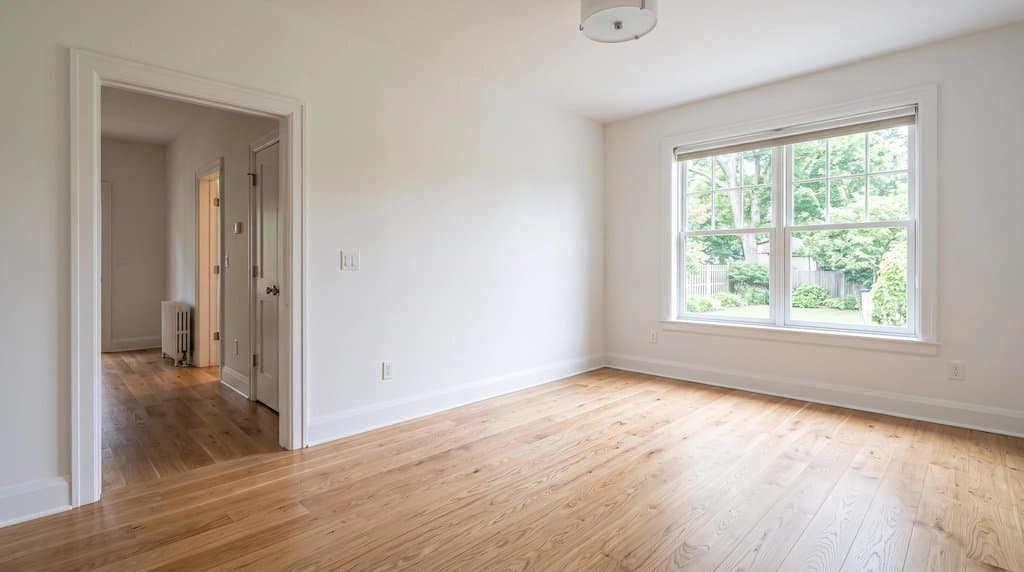
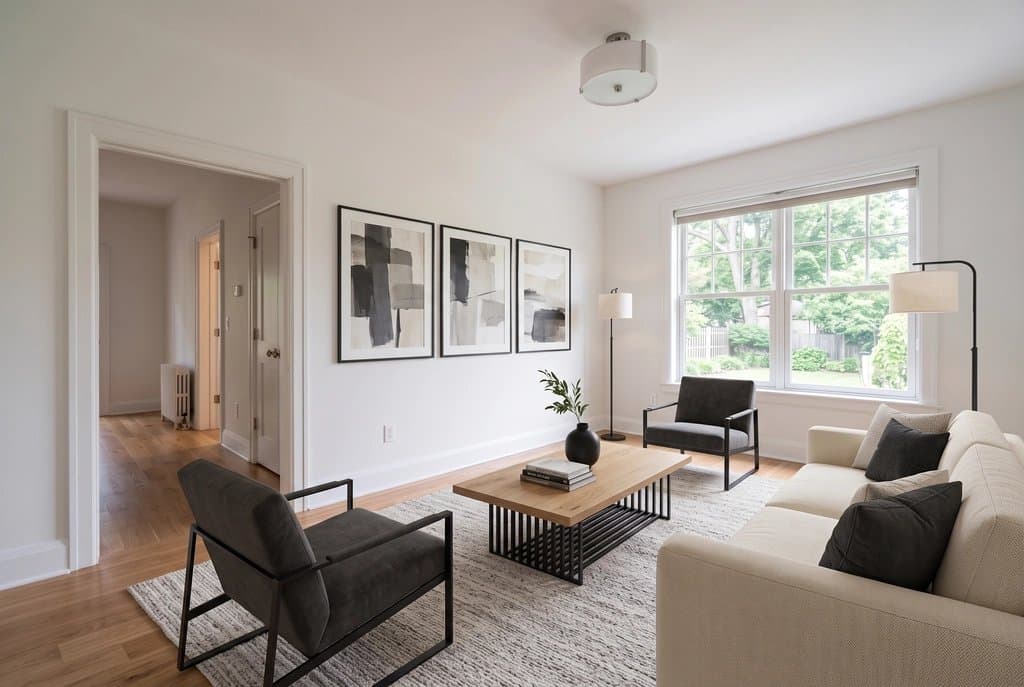
Empty living room before virtual stagingThe same living room staged by the Listing Kit in the gallery style modern
Unretouched Listing Kit output, style "modern". The input is an AI-generated sample room. More before/after pairs on the virtual staging page.

2. Collov AI

Best for: Agents who also want listing videos and virtual tours

Price
Standard $19/month billed yearly for 60 photos ($27 billed monthly); Advanced $49 ($59) for 150; Premium $79 ($99) for 263
One listing
Fits in the $19 Standard month
Turnaround
10 seconds (stated)
Head to head
Collov AI alternative: Collov AI vs Listing Kit, per listing
Source
collov.ai, checked October 8, 2026

Good

  • Pricing page lists a "one-click staging disclaimer".
  • Furniture removal, unlimited regenerations and a commercial license on the entry plan.
  • Higher plans add multi-angle staging, chat editing, AI virtual tours and 360° panoramas.

Watch out

  • The pricing page does not mention keeping or linking the unaltered originals.
  • Twilight, lawn and sky edits start on the $49 plan.

3. Virtual Staging AI

Best for: Lowest price per staged photo at volume

Price
From $16/month billed yearly ($192) for 6 photos; $19 for 20; $39 for 60; $79 for 150
One listing
Fits in the $16 Basic month (6 photos), on a yearly plan
Turnaround
10 seconds (stated)
Head to head
Virtual Staging AI alternative: Virtual Staging AI vs Listing Kit, per listing
Source
virtualstagingai.app, checked October 8, 2026

Good

  • 50+ design styles, furniture removal and unlimited renders on every plan.
  • No watermark; images stored on Standard and up.

Watch out

  • The listed monthly prices are the yearly-billing rates.
  • Its pages do not mention disclosure labels, originals or one style across a listing.

4. REimagineHome

Best for: Redesigning furnished rooms and exteriors, not only empty ones

Price
Essential $19/month for 30 credits, Pro $36 for 200, Advanced $59 for 400, Agency $119 for 900 (pricing page on October 9, 2026)
One listing
6 credits of a monthly plan
Turnaround
Not stated
Head to head
REimagineHome alternative: REimagineHome vs Listing Kit, per listing
Source
reimaginehome.ai, checked October 8, 2026

Good

  • Conversational design, reference photos and listing batch processing on Pro.
  • Landscaping and exterior edits on the entry plan.

Watch out

  • Batch processing and reference photos need the Pro plan.
  • The pricing page does not mention disclosure labels or originals.

5. Apply Design

Best for: Paying per image, with no subscription

Price
Apply Coins at $7–$10 each; auto staging 1.5 coins a photo, DIY staging 1 coin
One listing
About $60 (DIY) to $90 (auto) for 6 rooms at the 1–9 coin rate
Turnaround
15 minutes for auto staging (stated)
Head to head
Apply Design alternative: Apply Design vs Listing Kit, per listing
Source
applydesign.io, checked October 8, 2026

Good

  • Drag-and-drop DIY editor with unlimited revisions.
  • Item removal included; the page mentions a money-back guarantee.

Watch out

  • Cost per photo is 10 to 20 times an AI subscription.
  • No gallery-wide style or disclosure features mentioned.

6. BoxBrownie

Best for: Luxury listings that need a human designer

Price
US$24 per image in the US, €21 in Europe (pricing page on October 9, 2026)
One listing
$144 for 6 rooms (US price)
Turnaround
Under 48 hours
Head to head
BoxBrownie alternative: BoxBrownie vs Listing Kit, per listing
Source
boxbrownie.com, checked October 8, 2026

Good

  • Done by people: fewer structural mistakes, real furniture choices.
  • Unlimited changes at no extra cost if requested within 2 months.

Watch out

  • Days instead of minutes; you send photos and wait.
  • Most expensive per photo in this list.

Which virtual staging software handles AB 723 disclosure?

ToolLabel on altered photosOriginals kept + link/QROne style across the listing
AI Architectures Listing KitYes, labeled copiesYes, originals folder + hosted link + QR per photoYes, gallery style
Collov AI"One-click staging disclaimer"Not statedNot stated
Virtual Staging AINot stated (claims "MLS compliant")Not statedNot stated
REimagineHomeNot statedNot statedNot stated
Apply DesignNot statedNot statedNot stated
BoxBrownieNot statedNot statedDesigner's choice

"Not stated" means the vendor's pricing or product page did not say so on October 8, 2026; the tool may still do it. Compliance is the agent's duty either way. What AB 723 asks and how the kit covers it: virtual staging for realtors. This is not legal advice.

Stage your listing with #1

$29 once for one listing (up to 25 photos, nothing renews), or Starter $29/month for 50 photos ($14.50 the first month). No free trial; 14-day money-back on the first payment. Cost details: virtual staging cost vs home staging.

Drop up to 25 listing photos or

JPG, PNG or WebP up to 20 MB · 100 credits per photo · each original is hosted unchanged with its own link

The kit contains the edited photos, copies with a visible “AI” label, your untouched originals, a hosted link and QR code to each original (ORIGINALS.html) and a disclosure text you can paste into the MLS remarks. AI can make mistakes: check every photo before you publish it, and never use edits to hide defects of the property.

Best virtual staging software: FAQ

What is the best virtual staging software for real estate agents in 2026?

For an agent staging whole listings, the best tool keeps one style across every room, labels each altered photo and keeps the originals linkable for AB 723 and the MLS. On those criteria we rank our own AI Architectures Listing Kit first (we make it; see the criteria and where others beat it). Collov AI is the pick if you want listing videos and tours, Virtual Staging AI is the cheapest per photo at volume, and BoxBrownie is the human-staged option for luxury listings.

What does virtual staging software cost in 2026?

AI staging apps cost about $16 to $79 a month for 6 to 263 photos (Virtual Staging AI, Collov AI, prices checked October 8, 2026). Pay-per-image tools such as Apply Design charge about $7 to $15 a photo, and human services such as BoxBrownie about $24 a photo (€21 in Europe). On AI Architectures, $29 once for one listing (up to 25 photos, nothing renews), or Starter $29/month for 50 photos ($14.50 the first month).

Which virtual staging software is AB 723 compliant?

No tool is compliant on its own: AB 723 puts the duty on the agent to disclose that a photo is altered and to make the original available. A tool helps when it labels the altered photos and keeps the originals with a link. Collov AI lists a one-click staging disclaimer; our Listing Kit gives labeled copies, the originals, a hosted link and QR code to each original and a disclosure text. This is not legal advice.

Is there free virtual staging software?

Some apps give a few free images or a trial (REimagineHome lists 5 free designs; Apply Design says the first image is free). AI Architectures has no free trial: you pay for a plan or a one-time listing pass, and every result is yours to use in the listing.

AI virtual staging or a human service?

AI is minutes and well under $1 a photo on a monthly plan, and works for most empty rooms photographed straight on. A human service such as BoxBrownie costs about $24 a photo and takes up to 48 hours, but a designer checks the result. Use AI for everyday listings, a human for a luxury listing or a difficult room.

Which AI model does AI Architectures use for staging?

Nano Banana 2.1. The prompt for every photo says to keep walls, windows, doors, floor, ceiling and camera as photographed; compare each result with the original anyway.

How were these tools checked?

From each vendor's own pricing or product page on October 8, 2026. We list only what those pages state; where a page did not state something (for example turnaround or a per-plan price), the table says so. Prices change, so check the vendor's page before you buy.

Stage your listing photos ↑

Real estate photo tools

Everything an agent needs for one listing, on one account. See all of them on the real estate photo tools page or read how agents use AI Architectures.

Land, lots & drone photos

Listing photo fixes

Virtual staging

Floor plans for listings